-1.png?width=500&height=96&name=Logo%202%20Colour%20-%20No%20background%20(5)-1.png)
Welcome to the new neuroflash interface.
If you're a little confused on your next login, no worries. The new design is faster and more intuitive. This overview explains what has changed, what has stayed the same, and shows you exactly where to find everything.
✅ All your data is safe: Documents, Brand Voices and target audiences remain untouched. The interface has been redesigned so you can reach your goals faster.
In this article
- What looks different at first glance
- The most important thing first: Digital Twins
- Creating content as before
- The left navigation bar: What has changed?
- Your first session in the new neuroflash
- What hasn't changed
What looks different at first glance
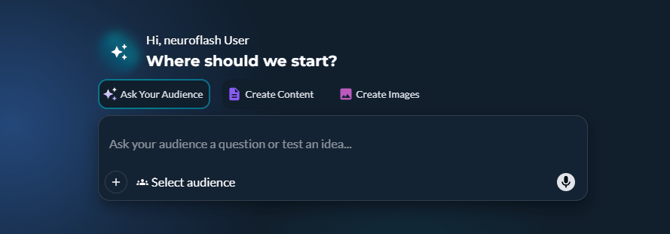
You land on a new home screen with three tabs:
| Tab | What you do here |
|---|---|
| Ask Your Audience | Talk directly to your target audience via Digital Twins |
| Create Content | The old home page. Create content as before. |
| Create Images | Generate AI images via prompt |
The default tab when opening is now "Ask Your Audience". This is the heart of the update.
The most important thing first: Digital Twins
The neuroflash Digital Twins are AI representations of real people, based on over 1 million real profiles. You ask them questions, and they respond the way your actual target audience would. A simulation with a validated prediction accuracy of 85–98 %.
How to work with Digital Twins
- Click on the "Ask Your Audience" tab
- Select your target audience from the dropdown. Either one you have created yourself, or a predefined one (e.g. Gen Z, Millennials, Baby Boomers)
- Type your question into the chat window
- The Digital Twins respond from the perspective of the selected target audience
💡 Tip: Automatically generated question suggestions appear below the input field. A great starting point if you're not sure where to begin.
The best part: You save time and reduce risk
Instead of waiting for external surveys or publishing content based on gut feeling, you can now validate immediately. Your Digital Twins respond like your real target audience, not like a generic LLM.
Typical use cases:
- Marketers: Play through and optimize campaign copy before launch
- CTOs & Leaders: Make important messaging decisions based on data, instead of guessing
- Consultants: Test strategic positions before they are presented
Fewer surprises after launch, faster decisions, greater confidence.
Creating content as before
The "Create Content" tab is your old home view. Nothing has changed content-wise. The way to get there is now just one click away:
- The chat window for content creation via prompt
- Selection of your target audience and brand voice
- Access to all your workflows for emails, blogs & articles, social media, and more
The left navigation bar: What has changed?
Brand Hub
Your target audiences, brand voices and knowledge base are still here.
What's new: After creating a target audience, matching Digital Twins are automatically found and assigned to that audience. The number of Digital Twins per target audience is limited depending on your pricing plan.
In the "Ask Your Audience" tab, you then select your desired target audience and ask your question in the chat window. The Digital Twins assigned to that target audience will be consulted.
Saved (previously: My Content)
You will no longer only find your documents here, but also your interactions. These are all the conversations you have had with your Digital Twins. Use the toggle switch to switch between:
- Interactions – Conversations with your target audience
- Documents – all created texts, as before under "My Content"
Tools (new in the navigation)
ResearchFlash and PerformanceFlash now have their own dedicated spot in the navigation. Previously, they were a little hidden on the home page under "Advanced Tools".
Your first session in the new neuroflash
You want to get started with content right away?
- Go to Home
- Click on the "Create Content" tab
- Work as usual
You want to find your old documents?
- Go to the left navigation bar
- Click on "Saved"
- Set the toggle to "Docs"
You want to try out Digital Twins?
- Click the "Ask Your Audience" tab or go to the home view
- Open the dropdown and select your target audience
- Click on a suggestion or type your own question into the chat window
- Read the response, ask a follow-up question
You want to find your conversations with the Digital Twins?
- Go to the left navigation bar
- Click on "Saved"
- Set the toggle to "Interactions"
What hasn't changed
- All your saved documents are there
- Your brand voices and target audiences are there
- All workflows work as before
- ResearchFlash and PerformanceFlash are there (now under "Tools")
- Content creation via chat window and prompt is identical
Still have questions?
Via the ? in the left navigation, you can find all important resources about neuroflash and your account. For further questions, feel free to reach out at support@neuroflash.com
Enjoy the new neuroflash. Your target audience is already waiting.